
Send List
Explanation
The Send List API allows you to send a message that includes a list of up to 10 choices.
Remarks
- You can use the "Send List" API in one case only - for reply to a message that the client sent, within 24 hours since the client sent his last message. If you send a message to a new client, or try to send a message to an old client (old client means that 24 hours since client's last message has passed), you must use the "Send Template Message" API instead. If you send a template message to the client, and the client did not reply yet, and you want to send another message to him, you must use the template message again.
- You can only send a message to private people, not groups.
- The billing is per "conversation". conversation means a 24 hours session between you and the client (this 24 hours conversation session is unrelated to the 24 hours timer for template message)
- You can send unlimited messages within the 24 hours session time of a conversation.
- 24 hours session conversation starts when you send a message to the client.
- Every time the user replies, the template message session resets. which means that you don't have to use template message during this 24 hours template message session.
- When the end user clicks on any of the list options, you will get it in the webhook as type "list" and the content of the button will be inside "body".
Settings:
|
URL |
https://api.99digital.co.il/whatsapp/v2/sendList |
|
Method |
JSON via POST |
Body:
|
Parameter |
Description / Example |
Mandatory |
Max length |
|
apiKey |
Your API key for the service |
yes |
|
|
from |
your WhatsApp account. international number without +. for example: 972771234567 |
yes |
|
|
to |
The number you want to send the message to. for example: 972501234567 |
yes |
|
|
header |
The title of the list box. you can have Emoji. |
no |
60 |
|
body |
The body text of the list box. Its usually widely used to describe what this list is about. \n for new line *text* for bold _text_ for italic ~text~ for strike through |
yes |
1024 |
|
footer |
Some footer message |
no |
60 |
|
buttonText |
The text of the button that will appear on the list box. you can use Emoji. |
yes |
20 |
|
itemTitle1-10 |
List of items, minimum is 1, maximum is 10. |
at least 1 item is mandatory |
24 |
|
itemDescription1-10 |
Extra description for the item, it will show below the title |
no |
72 |
|
replyTo |
In case you want to reply to a message that the end user has sent (quoted message), here you can provide the unique ID of that message |
no |
|
|
showRequest |
You can get back in the response an object with all the request you sent (without the 'apiKey') default is off (0) 1 - enable |
no |
1 |
Sample request:
{
"apiKey": "53456345",
"from": "972501234567",
"to": "972502222222",
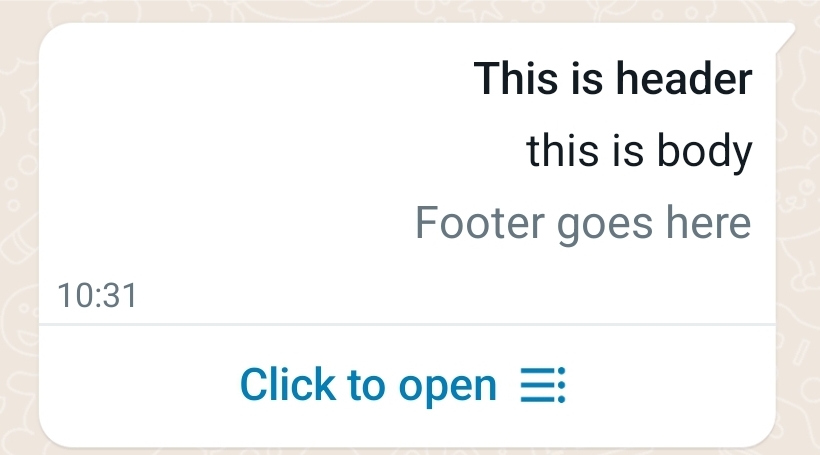
"header": "This is header",
"body": "this is body",
"footer": "Footer goes here",
"buttonText": "Click to open",
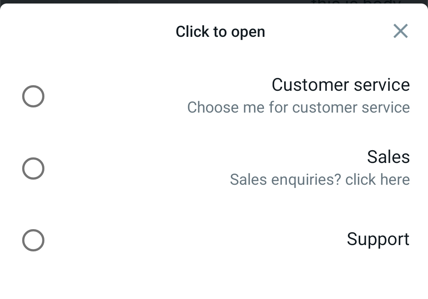
"itemTitle1": "Customer service",
"itemDescription1: "Choose me for customer service",
"itemTitle2": "Sales",
"itemDescription2": "Sales enquiries? click here",
"itemTitle3": "Support"
}
Sample screenshot of the message:
Sample screenshot after the "click to open":
Response:
{
"status": "OK",
"unique": "65dfd4r4dref34rdfxd34r",
"header": "your header",
"body": "your body",
"footer": "your footer",
"timestamp": 1600115719,
"from": "972507654321",
"to": "972501234567",
"templateTimeLeft": "400",
"reason": 1
}
Response-Explain:
|
Parameter |
Description |
||||||||||||||||||||||||||||||
|
status |
OK or FAIL |
||||||||||||||||||||||||||||||
|
unique |
unique ID for any message |
||||||||||||||||||||||||||||||
|
header |
Your header text |
||||||||||||||||||||||||||||||
|
body |
the text you sent |
||||||||||||||||||||||||||||||
|
footer |
footer text |
||||||||||||||||||||||||||||||
|
timestamp |
time stamp |
||||||||||||||||||||||||||||||
|
from |
your WhatsApp account |
||||||||||||||||||||||||||||||
|
to |
the number that the message was sent to |
||||||||||||||||||||||||||||||
|
templateTimeLeft |
amount of minutes left since client's last message. if passed, you must use Template Message. This value resets every time the client is sending you a message. |
||||||||||||||||||||||||||||||
|
conversationTimeLeft |
Deprecated this value is no longer in use. Conversation time left is now part of the webhook response instead. This parameter will be removed in future updates. until then, this value will show 0 always. |
||||||||||||||||||||||||||||||
|
reason |
'reason' is the status explanation in case of FAIL
|
Created with the Personal Edition of HelpNDoc: Full-featured Help generator