
Send Reaction
Reactions are Emoji response to an incoming message.
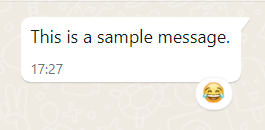
For every incoming message you get to your webhook, you can send a reaction emoji.
More Remarks
- You can only have one reaction per message.
- The emoji can be any emoji you want. you can send rendered emoji (🧐) or Emoji java source code ("\uD83D\uDE00").
- You can send a reaction to any incoming or outgoing message.
Settings:
|
URL |
https://api.99digital.co.il/whatsapp/v2/sendReaction |
|
Method |
JSON via POST |
Body:
|
Parameter |
Description / Example |
Mandatory |
|
apiKey |
Your API key for the service |
yes |
|
from |
your WhatsApp account. international number without +. for example: 972771234567 |
yes |
|
to |
The number you want to send the reaction to. for example: 972501234567 |
yes |
|
unique |
The unique ID of the message you wish to attach the reaction. |
yes |
|
reaction |
The Emoji you wish to react. if you want to remove the Emoji, just send empty value. |
yes |
|
showRequest |
You can get back in the response an object with all the request you sent (without the 'apiKey') default is off (0) 1 - enable |
no |
Response:
{
"status": "OK",
"unique": "65dfd4r4dref34rdfxd34r",
"messageUnique": "65dfd4r4dref34rdfxd34r",
"reaction": "😀"
"reason": 1
}
Response-Explain:
|
Parameter |
Description |
||||||||||||
|
status |
OK or FAIL |
||||||||||||
|
unique |
The unique ID of the reaction message. |
||||||||||||
|
messageUnique |
The unique ID you provided. |
||||||||||||
|
reaction |
The emoji you used. |
||||||||||||
|
reason |
'reason' is the status explanation in case of FAIL
|
Created with the Personal Edition of HelpNDoc: Qt Help documentation made easy